You used to share popcorn on the same couch. Now your friends are scattered across time zones, and “let’s watch something this weekend” turns into a mess of unsynced screens, group-chat debates that go nowhere, and someone always dropping out. Sound familiar?
The good news: learning how to start a movie club with friends online is easier than you think. You need the right setup, a simple routine, and one good rule for picking films. This guide walks you through every step, from choosing a free platform to keeping your group excited three months in.
Why a Virtual Movie Club Is the Best Way to Stay Close
When you live far from the people you care about, casual time together disappears first. You stop “just hanging out.” Everything becomes scheduled, and it starts to feel like effort.
A virtual movie club fixes this. It gives your group a reason to show up on the same night, every month, without anyone having to plan something elaborate. The movie does the work. You just have to press play together.
Here are a few things that make it work better than a random video call:
- You have a shared experience to react to in real time.
- The movie fills natural conversation gaps.
- A set schedule keeps the habit alive.
- Anyone can host without needing to be “the social one.”
I have seen this work for online movie clubs for long-distance friends across four different time zones. When you give the group a structure, most people actually show up.
Choose Your Platform: The No-BS Guide to Free and Easy Tools
The biggest mistake beginners make is overthinking this step. You do not need a paid subscription or a complicated setup. Three tools cover almost every situation.
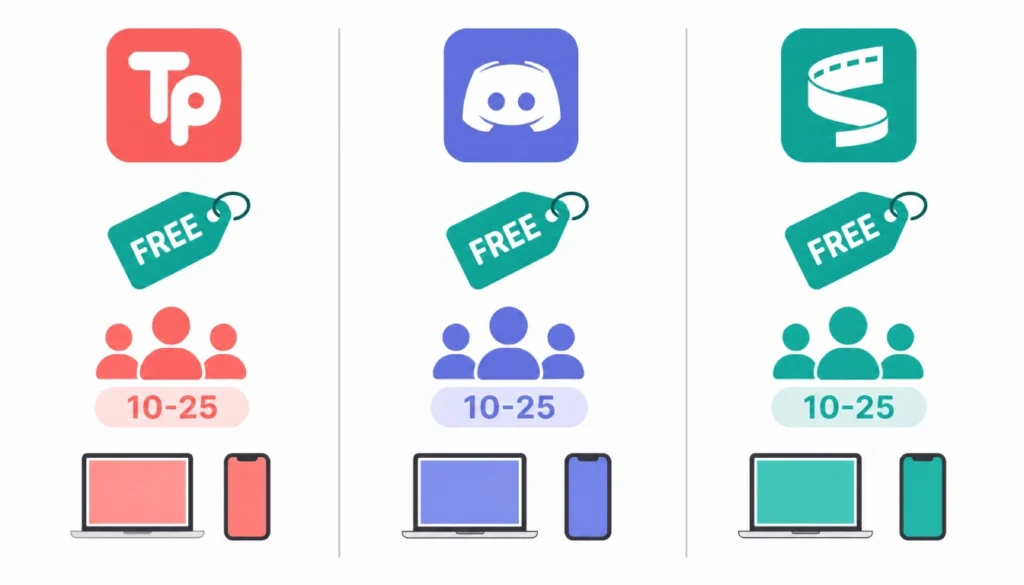
Here is a quick breakdown of the best apps for online movie nights with friends:
Teleparty (formerly Netflix Party)
- Free browser extension for Chrome.
- Works with Netflix, Disney+, HBO Max, Hulu, and Amazon Prime.
- Syncs playback automatically and includes a chat sidebar.
- Best for: groups where everyone already has the same streaming subscription.
Discord
- Free for everyone, no subscription needed.
- Use voice or video chat while screen sharing the movie.
- Video quality depends on your internet speed; Go Live gives better resolution for Discord Nitro users.
- Best for: groups who already use Discord and want voice chat over text.
Scener
- Free browser extension, works with multiple streaming platforms.
- Supports up to 10 viewers on the free plan, with video selfie mode so you can see each other’s faces.
- Best for: smaller groups who want to see reactions while watching.
My recommendation for first-timers: start with Teleparty if your group shares one streaming platform. It requires the least setup, and everyone can be watching together in under five minutes.
How to Start a Movie Club with Friends Online Using the Manual Sync Method
Not everyone will have the same streaming service. Buying a movie to rent together is often cheaper than two subscriptions. In that case, you sync manually, and it works perfectly once you have tried it once.
Here is how to sync movies with friends manually using the countdown method:
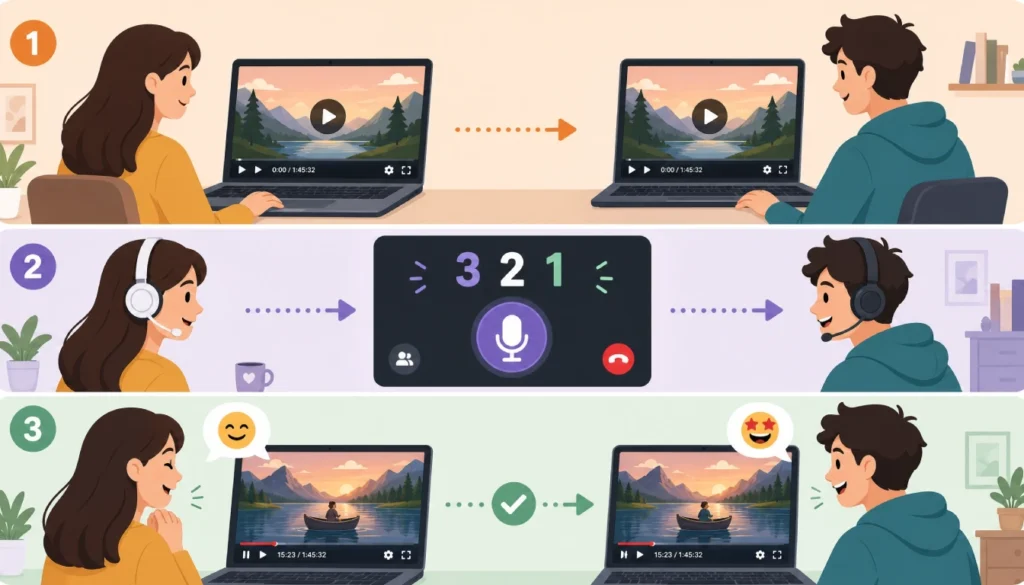
Step 1. Everyone rents or owns the same movie from the same source (iTunes, Amazon, YouTube Movies). Confirm the runtime matches so you are watching the same version.
Step 2. Open a voice call on Discord, WhatsApp, or any platform where everyone can hear each other clearly. Headphones on for everyone. This avoids audio feedback from the movie playing through speakers.
Step 3. Pause the movie at 0:00:00 (the very first frame after any studio logos). The host confirms everyone is paused at the same point.
Step 4. The host counts down out loud: “Three, two, one, play.” Everyone hits play at the same moment.
Step 5. Check in after 30 seconds. Ask if anyone seems ahead or behind. If someone is off by a few seconds, they pause, the host calls a new countdown, and you re-sync.
When I first tried hosting a virtual movie night, I used Zoom’s screen share and hoped for the best. The audio echoed, the video lagged, and my friends spent the first 20 minutes complaining they were on different scenes. After that, I switched to Discord with this countdown method and a strict headphones rule. We have had zero sync issues since. That is the method I walk groups through now, and it takes less than two minutes.
Picking Films Without the Drama: Voting Systems, Themes, and Rotations
Nothing kills a virtual movie club faster than 45 minutes of “I don’t mind, what do you want to watch?” Set a system before your first night and stick to it.
The rotation method is the simplest. Each member picks the film for one meeting. No votes, no debate. If it is your turn, you choose. Everyone else commits to watching it, even if it is outside their usual taste. This method also removes any pressure to please everyone.
The themed month method works well for groups who love variety. You vote on a theme (90s comedies, Korean thrillers, Oscar winners) and anyone can suggest a film that fits. Run a quick poll in your group chat using Google Forms, a WhatsApp poll, or a free tool like Poll Everywhere. Pick the winner with the most votes.
Virtual movie club ideas for beginners to get your first few months started:
- “Movies we missed in theaters” (recent releases you all skipped)
- Director month (one director’s films back to back)
- One film per continent (six months of international cinema)
- Decade rewatch (a different decade each month)
- Book-to-film club (read the book, then watch the adaptation)
Set your theme calendar at the start of the year. It takes one group call, and it saves you from the “what are we watching” conversation every single month.
Setting a Schedule That Actually Survives the First Month
Most virtual movie clubs die in month two. The excitement fades, someone misses a session, and the group chat goes quiet. The fix is consistency, not enthusiasm.
Pick one day and time and protect it. “First Saturday of the month at 8 pm” is a schedule. “Whenever works for everyone” is not.
A few rules that keep groups on track:
- Set the next date before you end the current session. Do not leave it for the group chat.
- Use a shared calendar invite so the date lives somewhere other than a message thread.
- Two members missing are fine. Three or more, you reschedule once, not permanently.
- Keep sessions to two hours max (one film, short discussion). Longer sessions are harder to commit to.
If your group spans multiple time zones, use World Time Buddy to find a slot that works. Someone will always get a slightly inconvenient time. Rotate the burden every few months.
How to Keep the Conversation Alive Before and After the Credits
The movie is one hour and forty-five minutes. The conversation around it should be just as good.
Before the film, share a short warm-up in the group chat. Send a trailer, a fun fact about the director, or one question to think about while watching. Something like: “This film was rejected by 12 studios before getting made. See if you can figure out why.” It takes two minutes to send and gives everyone something to chew on.
During the film, keep the chat open if you are using Teleparty or Discord. Reaction messages keep the energy up, especially for comedies or horror. If your group prefers to watch without distraction, save it for after.
After the film, run a quick discussion with three questions. Prepare them in advance so the conversation does not drift. Some starter examples:
- What was the moment you decided you liked or disliked this film?
- Which character did you understand the most and why?
- If you could change one scene, what would it be?
You do not need to turn it into a film class. Even 15 minutes of honest reactions keep the club feeling like more than just a streaming session. It is the part people remember.
Real-Life Virtual Movie Club Rules Template: Copy and Paste
Set these rules before your first session and share them in your group chat. Paste them as-is or edit to fit your group.
Our Virtual Movie Club Rules
- One member picks the film per session. No vetoing someone else’s pick.
- Everyone confirms attendance at least 24 hours before the session.
- Headphones on during the film. No speaker audio.
- No spoilers in the group chat before the session.
- We vote on next month’s theme at the end of each session.
- Missing two sessions in a row means you skip your next turn to pick.
- We start on time. Anyone joining late, catch up, and do not ask to rewind.
- Reactions during the film are welcome. Side conversations wait until after.
Feel free to drop rule 6 if your group is more relaxed. The point is that everyone knows what to expect. Written rules prevent awkward conversations later.
Smooth-Sailing Checklist: 10 Things to Do Before Your First Night
Run through this list the day of your session. It takes five minutes and prevents 90% of technical problems.
- [ ] Confirm all members have the correct film (same platform, same version).
- [ ] Share the meeting link or Discord server invite at least two hours early.
- [ ] Test your voice call before the session starts.
- [ ] All headphones are plugged in or connected.
- [ ] Browser extensions (Teleparty, Scener) installed and working.
- [ ] Film paused at 0:00:00, ready to sync.
- [ ] Your discussion questions are written down and ready.
- [ ] Next session date confirmed and calendar invite sent.
- [ ] Snacks sorted. (Non-negotiable.)
- [ ] Group chat muted during the film so notifications do not distract.
Print this or save it to your notes app. Share it with whoever hosts each session.
One Last Thing Before You Press Play
Starting a virtual movie club with friends online takes about 20 minutes of setup and zero tech skills. You pick a platform, agree on a schedule, set a film-picking rule, and show up on the night.
The groups that stick with it long-term are not the ones with the fanciest tools. They are the ones who committed to a simple system and kept the bar low enough that everyone could actually show up.
If you have been putting this off because it seemed complicated, now you have everything you need. Set the date tonight, send the rules template to your group, and pick the first film before the week is out.
That is how you start a movie club with friends online and actually keep it going.