
You have a business idea that keeps you up at night. You’re afraid to waste time and money if nobody actually wants it. What if you could get real customer feedback this afternoon, without spending a dollar or learning a new tool? You can. This guide shows you how to test a business idea using only Google Forms, step by step. No coding, no budget, no guesswork.
Why Use Google Forms for Business Idea Validation?
Google Forms is free, fast, and already familiar to most people. You don’t need a landing page. You don’t need an email list. You need a link and a few honest questions.
This is Google Forms for business idea validation at its simplest: build a short survey, send it to real people, and read their answers before you build anything.
Real example: I faced this two years ago with a digital product idea. I was convinced busy parents would pay for a weekly meal-planning spreadsheet. Before building anything, I created a 5-question Google Form asking if they struggled with meal planning and how much they’d pay for a fix. I shared it in a local Facebook group and got 40 responses in three days. Eighty-five percent said they wanted the solution. Only two people said they’d pay more than $5. That was the answer I needed. I pivoted the idea into a free lead magnet instead, and it grew my email list by 1,200 people. A five-minute form saved me three months of wasted work.
That’s the whole point of this method. You validate a business idea with Google Forms for free, and you find out the truth before you sink time into something nobody wants.
Step 1: Define Your Hypothesis and Ideal Customer
Before you write a single question, write down what you actually believe.
A hypothesis is one sentence. For example: “Busy parents will pay $10 a month for a weekly meal-planning tool that saves them time.”
Then define who you’re testing this on. Be specific:
- Age range
- Job or life situation
- Where they hang out online
- The exact problem they’re dealing with
Do this: Write your hypothesis in one clear sentence you could test as true or false. Not that: Don’t write a vague idea like “people want better meal planning.” That can’t be validated. It’s too broad to measure.
Step 2: Build Your Validation Survey in Google Forms
Open Google Forms and start a new blank form. Title it something direct, like “Product Idea Feedback.” Keep the whole survey under 10 questions. Five to seven is the sweet spot.
Use a mix of question types:
- Multiple choice for quick answers
- A linear scale for interest level (1 to 5)
- One open-ended question for detailed feedback
Keep the design simple. You don’t need custom themes or logos. A plain form with clear questions works just as well as a polished one.
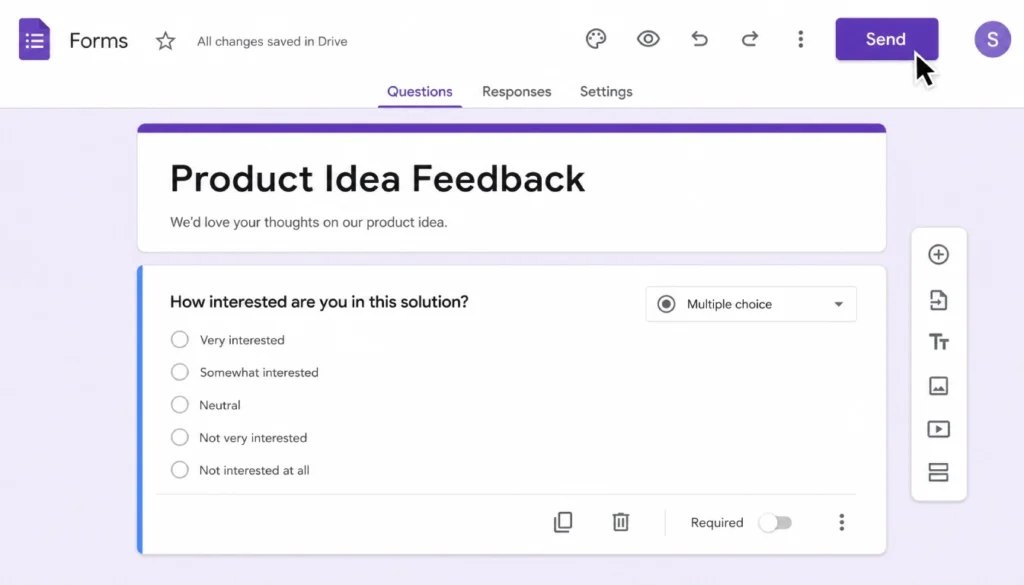
Alt text: Google Forms survey editor showing a business idea validation question with multiple-choice options.
Caption: A simple validation form in Google Forms. No design skills needed.
Title attribute: Create a validation survey in Google Forms
File name: google-forms-validation-survey-example.jpg
Test Product Idea Google Forms Template
If you want a shortcut, copy this basic structure into your own form:
- What’s your biggest challenge with [problem area]?
- How often do you deal with this problem?
- Have you tried to solve it before? How?
- On a scale of 1 to 5, how interested are you in a solution like this?
- Would you pay for a tool that solved this? If yes, how much?
- What’s your email if you’d like early access?
This test product idea Google Forms template works for almost any niche. Swap in your specific problem and audience, and you’re ready to send it out.
Step 3: Write Questions That Reveal Real Demand
This is where most people get it wrong. Interest is not the same as demand. People will say they “love” your idea and never pay for it.
Google Forms idea validation questions need to dig past politeness and get to real intent. Ask about money, habits, and past behavior, not hopes.
Do this: Ask “How much have you spent trying to solve this problem in the last year?”
Not that: Don’t ask “Would you find this helpful?” Everyone says yes to that question.
Here are Google Forms idea validation questions that actually work:
- “What have you already tried to fix this problem?”
- “How much money have you spent on solutions so far?”
- “If this existed today, would you buy it? What would stop you?”
- “Rank these three features by how much you need them.”
Questions about past behavior tell you more than questions about future intentions. People are honest about what they’ve already done. They’re optimistic, sometimes inaccurate, about what they’ll do next.
Step 4: Distribute Your Survey to Get Honest Feedback
A great form with no responses tells you nothing. Distribution is half the job.
Send your form to people who match your ideal customer, not just anyone you know. Friends and family tend to be too nice. Their feedback can mislead you.
Good places to share your form:
- Niche Facebook groups where your audience already talks about this problem
- Subreddits related to your topic (check the rules first)
- Your own email list, if you have one
- Direct messages to 10 to 15 people who fit your target profile
Do this: Share where your ideal customer already spends time.
Not that: Don’t mass-post in unrelated groups. That’s spam, and it gets you banned, plus useless data from people who aren’t your audience.
Aim for at least 30 to 50 responses before you conclude. Fewer than that, and your data is too thin to trust.
Step 5: Analyze Responses and Decide “Go or No-Go”
Google Forms automatically turns your answers into charts and summaries. Open the “Responses” tab and look at the summary view first.
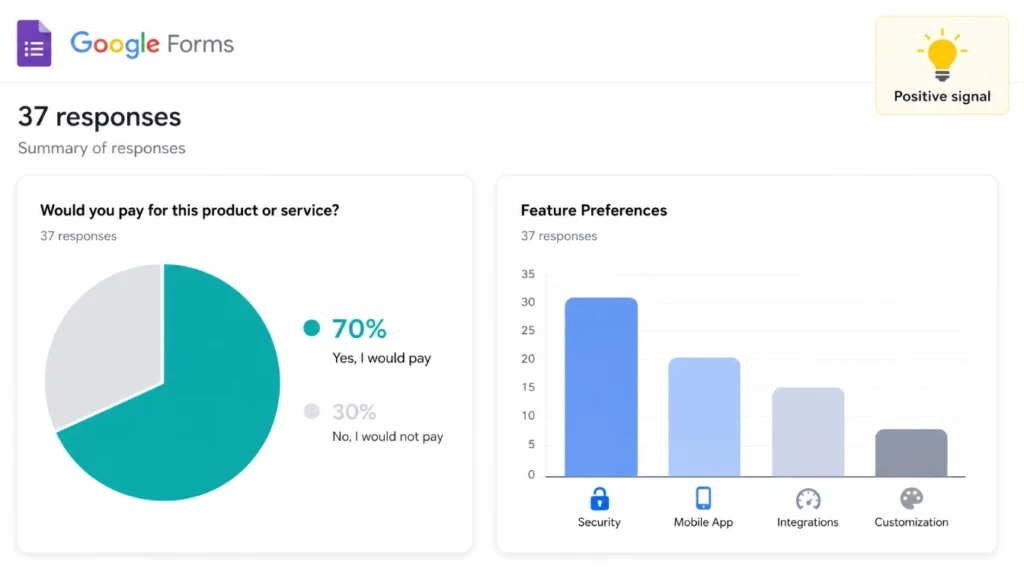
Alt text: Google Forms response summary with pie chart and bar graph for business idea validation data.
Caption: Google Forms automatically turns your data into easy-to-read charts.
Title attribute: Analyze Google Forms responses for idea validation.
File name: google-forms-validation-response-charts.jpg
Look for these signals:
- Strong go signal: Over 50% say they’d pay, and several mention a specific price.
- Weak signal: High interest scores but vague or low willingness to pay.
- No-go signal: Low interest, or people say they’ve already found a free fix.
I’ve run this process with more than a dozen small product ideas. The most common mistake I see is treating a high interest score as proof of demand. Interest is cheap. Money and effort are expensive. Watch for what people are willing to give up, not just what they say they like.
Common Mistakes That Sabotage Your Results (And How to Avoid Them)
Mistake 1: Asking leading questions. “Wouldn’t you love a tool that saves you time?” pushes people toward yes. Fix it: ask neutral questions, such as “How do you currently handle this?”
Mistake 2: Surveying the wrong audience. If you ask your coworkers about a fitness app for new parents, you’ll get noise, not signal. Fix it: only distribute where your actual target customer spends time.
Mistake 3: Ignoring the open-ended answers. Numbers tell you what people think. Comments tell you why. Fix it: read every open text response. The exact words people use often become your best marketing copy later.
Conclusion: Your Next Step
You don’t need a budget, a developer, or weeks of planning to know if your idea has a future. This is exactly how to test a business idea using only Google Forms: define your hypothesis, build a short survey, ask sharp questions, share it with the right people, and read the results honestly.
Start today. Open a blank Google Form, write five questions from the template above, and send it to 20 people who match your ideal customer. You’ll have real answers by tomorrow.
Have you tried validating an idea this way? Share your results in the comments, or download the template above and put it to work this week.