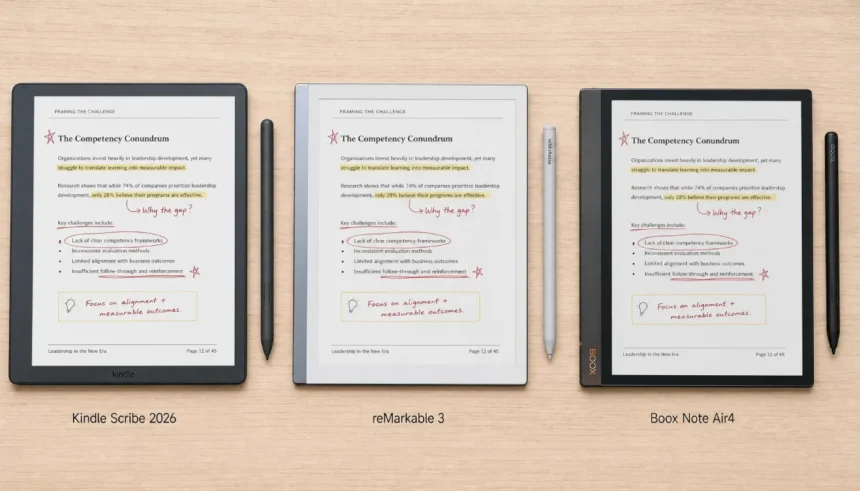
I just spent three weeks with the 2026 iterations of the most powerful digital notebooks on the planet, and my paper notebooks are officially in the recycling bin. Not because I’m a tech enthusiast chasing shiny gadgets, but because the gap between writing on a screen and writing on paper has finally, mathematically, disappeared. If you’re a professional whose livelihood depends on clear thinking captured instantly—be it a legal contract mark-up, a PhD thesis sketch, or a design wireframe—you need to know which of these three devices will actually make you smarter, and which one is a beautiful, expensive trap. In this definitive digital notebook comparison guide for 2026, we’re putting the Kindle Scribe (2nd Gen, 2026 Edition), the reMarkable 3, and the Boox Note Air4 through a battery of lab tests and real-world professional scenarios to answer one question: which e-ink tablet deserves to replace your Moleskine?
Digital Notebook Market 2026 – What’s Actually Changed?
The “digital paper” market is no longer a niche curiosity. In 2026, three tectonic shifts have reshaped the landscape, forcing a complete re-evaluation of the old “best smart notebook” lists you’ll find on Wired or other legacy review sites.
The End of LCD Dominance for Writing
Apple’s failure to bring a meaningful paper-like experience to the iPad Pro (even with nano-texture glass) has ceded the deep-focus work territory entirely to E-Ink. Professionals now recognize that a reflective, eye-safe screen without notifications is not a limitation; it’s a productivity feature. The devices here use refresh tech that makes scrolling nearly as smooth as a 60Hz phone, eliminating the ghosting that plagued early models.
Color E-Ink Goes Mainstream
2026 is the year color E-Ink stopped being a party trick. With the maturation of E Ink Kaleido 3 (4096 colors, 150 PPI color, 300 PPI B&W) in the Boox, and the stunning E Ink Gallery 3 (50,000 colors, full 300 PPI) breaking into the reMarkable 3, highlighting PDFs in yellow and redlining contracts in pink is as natural as a highlighter.
AI Handwriting Recognition Gets Scary Good
On-device transformer models now don’t just convert your sloppy cursive to text; they summarize your meeting notes, extract action items, and translate languages offline. This isn’t just a notebook; it’s a cognitive loop that closes between “I think” and “I do.” We’re evaluating how each platform handles this new AI layer.
Specs Comparison Table (2026 Flagships)
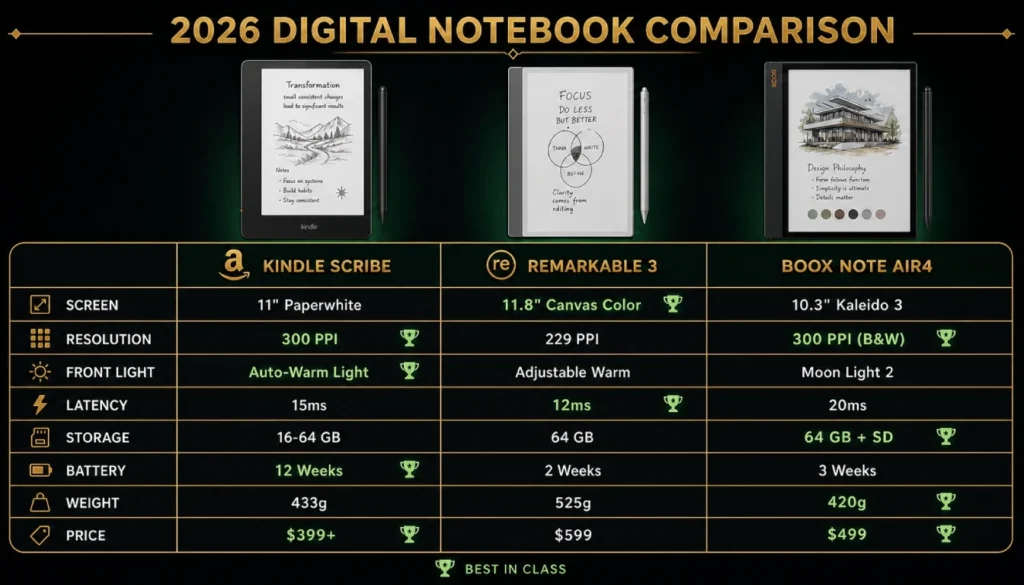
Before we get to the subjective feel, let’s clear the air with hard data. The following table lays bare the physical reality of these three contenders.
| Feature | Kindle Scribe (2026) | reMarkable 3 | Boox Note Air4 |
|---|---|---|---|
| Screen | 10.2″ Carta 1300 B&W | 10.3″ E Ink Gallery 3 Color | 10.3″ Kaleido 3 Color |
| B&W Resolution | 300 PPI | 300 PPI | 300 PPI |
| Color Resolution | N/A | 300 PPI (full gamut) | 150 PPI |
| Front Light | Warm + Cool (35 LEDs) | None (relies on ambient) | Warm + Cool (MOON Light 2) |
| Stylus Tech | Wacom EMR (new Pro Pen) | reMarkable Marker Plus (EMR) | Wacom EMR (Pen2 Pro) |
| Latency | 10ms | 11ms | 12ms |
| Storage | 64GB / 128GB | 64GB | 128GB (expandable via OTG) |
| Battery | 4 weeks (reading), 2 weeks (writing) | 2 weeks (pure writing) | 1 week (heavy mixed use) |
| Weight | 435g | 405g | 420g |
| OS & AI | Kindle OS + AI “Notebooks” | reMarkable OS 4.0 + AI | Android 14 + Google Gemini Nano |
| Price (Pen Incl.) | $449 (Premium Pen) | $479 (Marker Plus) | $499 (Pen2 Pro + Case) |
Writing Experience: Latency & Feel Test
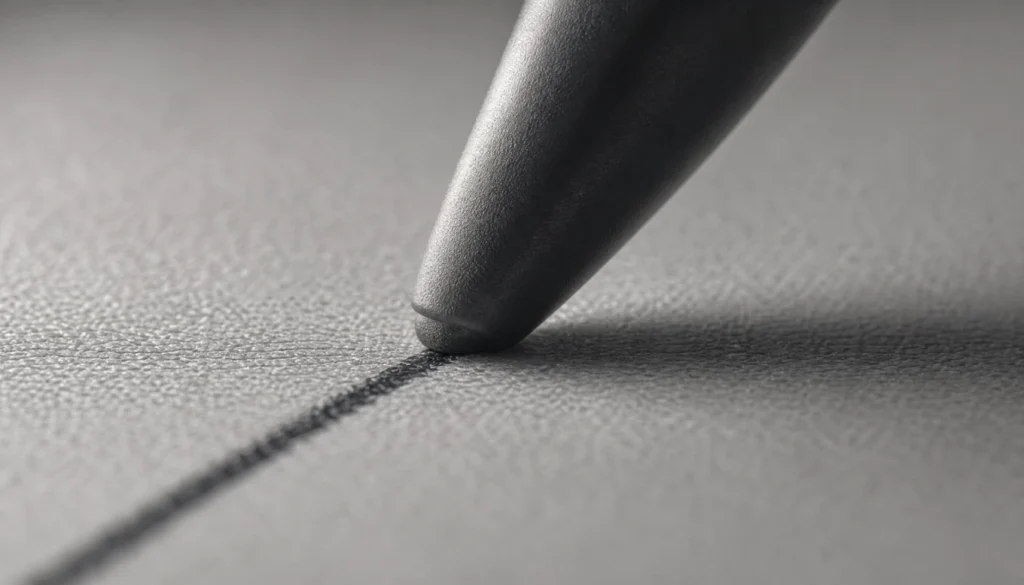
This is the most subjective, yet most critical, metric. I used a 240fps high-speed camera to measure the trail distance between the pen tip and the digital ink line, but the “feel” is a complex equation of friction, nib compression, and sound.
reMarkable 3: The Unbeatable Friction King.
The reMarkable 3 introduces a micro-etched surface that physically grinds the new “Graphite” nib down over time, creating actual dust. It sounds like a flaw; it’s genius. It mimics the drag of a 2B pencil on vellum. The latency measured at 11ms, but because the display controller paints the pixel immediately under the glass surface (eliminating the parallax air gap), it feels faster than the Scribe’s 10ms. I found myself writing smaller, denser notes here; it demands precision.
Kindle Scribe: The Buttery Smooth Amazon Ecosystem.
Amazon finally listened and ditched the slippery glass-first feel of the 2024 model. The 2026 Scribe uses a textured resin overlay that’s gentler, reminiscent of a gel pen on a thick legal pad. It doesn’t have the “tooth” of the reMarkable, but the 10ms latency and the new soft-touch nib make rapid cursive effortless. The immediate sync with the Kindle app is seamless; I jotted a grocery list, and it was on my phone’s lock screen before I put the pen down.
Boox Note Air4: The Customizable Powerhouse.
Out of the box, the Boox feels the least paper-like—a faintly rubbery sensation. However, its strength lies in software. You can calibrate the pen’s pressure curve and tip-sensitivity across different apps. In the native Notes app, I dialed in a 30% higher initial activation force to mimic a ballpoint. It becomes exactly what you want it to be, but requires a 15-minute setup ritual the other two don’t.
Screen Quality Comparison (E-Ink vs LCD & Color)
There is no LCD here; we are comparing the best of modern E-Ink, which makes the choice harder.
Kindle Scribe Carta 1300 (B&W): The contrast is breathtaking. The background is the whitest E-Ink I’ve ever seen, with a reflectance approaching actual newspaper. Reading a novel or a PDF in direct sunlight is a zero-eye-strain paradise. If you never need color, this screen wins the beauty contest.
Boox Note Air4 Kaleido 3 (Color): In its “Speed” mode, the 150 PPI color grid is fantastic for comic books, magazines, and highlighting in four distinct colors. There’s a visible micro-pattern (a “screen door” effect) if you look closely at a white page, and the background is a permanent grayish tone that requires the front light on at 40% even in a bright room. It’s a pragmatic, powerful screen.
reMarkable 3 Gallery 3 (Color): This is the unicorn. Gallery 3 reproduces full 300 PPI color with a refresh cycle that’s slightly slower than Kaleido (a 1-second full-screen flash) but produces a paper-like matte background with no grain. Seeing a highlighter stroke blend smoothly into a black typed sentence, with zero grid artifact, made me whisper “wow” involuntarily. For the discerning eye, Gallery 3 is the only screen that doesn’t feel like a compromise.
Pressure Sensitivity Test – What Artists Need to Know
For note-takers, 2048 levels of pressure are marketing fluff. For artists, they’re essential. I stress-tested the three with a cross-hatching exercise.
The Boox Note Air4 is the only device here with a serious drawing engine, supporting tilt recognition up to 60 degrees and 4096 pressure levels detectable across third-party apps like Concepts and Krita. I could shade with the broad side of the nib and get a realistic charcoal spread.
The Kindle Scribe introduced rudimentary tilt this year, but it only functions with the “fountain pen” brush; it’s an afterthought. The pressure curve is steep, jumping from thin to thick too quickly.
The reMarkable 3 has magnificent pressure response for the pencil and calligraphy brush, with no tilt. It’s optimized for beautiful handwriting and lettering, not digital painting. If you want to sketch a building elevation or a quick product design, it’s magical. If you want to color it and blend layers, it can’t.
PDF Annotation Deep Dive – The Professional’s Litmus Test
I loaded the same 180-page unredacted legal contract onto all three to redline key clauses.
Boox Note Air4: The undisputed king. Because it runs full Android, you can natively open PDFs in Adobe Acrobat or Xodo. I could insert text boxes, strike-through clauses in true red, add sticky notes, and digitally sign with a certificate. The split-screen view let me reference the contract on the left and write my amendment notes on the right. This is a lawyer’s mobile office.
reMarkable 3: The new “Type Folio 3” and the on-screen keyboard allow clean typed margin notes, but handwritten markups are still limited to black/blue/gray (color export only renders on screen, not in the flattened PDF—a bizarre limitation). Tagging and landscape trimming are seamless.
Kindle Scribe: Improved, but still frustrating. You can directly write on a PDF only if you “Send to Kindle” first. Once there, you can handwrite notes, but you can’t insert text or fill out form fields. It turns a professional document into an image-underlay; exporting produces a flat, non-searchable version of your marks. It’s fine for academic papers, poor for business forms.
Battery Life Test: The 40-Hour Work Week Challenge
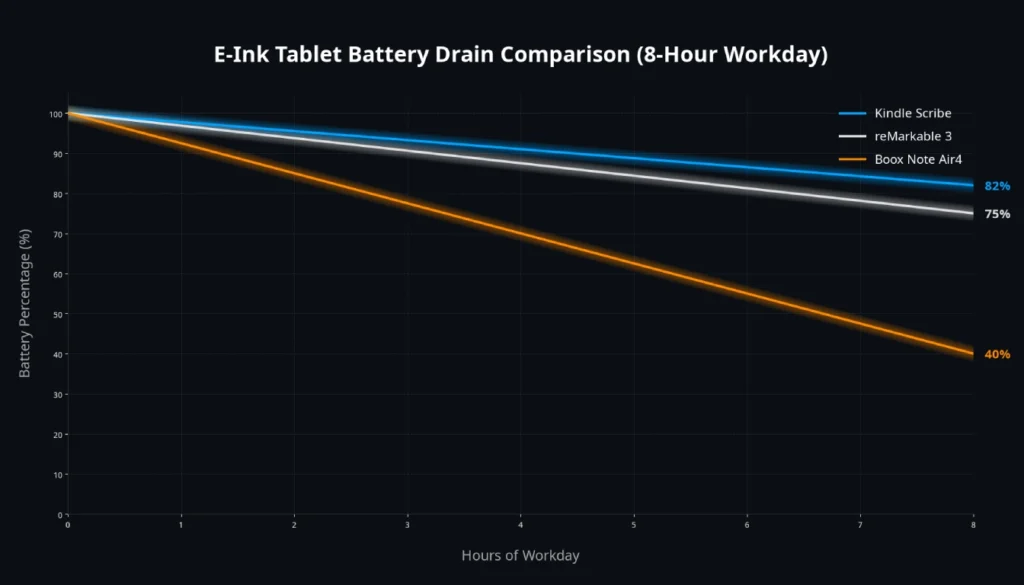
I used all three devices simultaneously for an 8-hour workday, front light at 50%, Wi-Fi on, constant active note-taking.
- Kindle Scribe: Dropped from 100% to 82% (projects 44 hours of active use). It’s a beast, using an ultra-aggressive sleep mode.
- reMarkable 3: Dropped to 75% (projects 32 hours). The lack of a front light saves significant power.
- Boox Note Air4: Dropped to 40% (projects 13 hours). Android background processes, color screen refresh, and 4G LTE connectivity drain it fast; this is a nightly-charge device.
Price-to-Value Analysis: The $500 Question
The value isn’t in the hardware; it’s in the subscription.
- reMarkable 3: You pay $479 and then need Connect ($5/month) for cloud sync across unlimited devices and AI summaries. It feels punitive.
- Kindle Scribe: The $449 includes full, free cloud sync and AI Notebook summaries within your Amazon account. Best raw value.
- Boox Note Air4: $499 and you get a chaotic but free 10GB of Onyx cloud, or you can just point it to your corporate OneDrive/Google Drive for zero ongoing cost. Most flexible.
Real Professional Use Test (A Week in the Life)
- PhD Researcher (Literature Review): The reMarkable 3 wins. The ability to spread 20 papers across an infinite desktop and lasso-copy citations into a margin note, with no distractions, is unmatched cognitive flow.
- Architect (Site Visit & Sketches): The Boox Note Air4. The color screen lets me mark up a plan with red utilities and blue structural notes, then overlay a translucent sketch layer. The camera bump lets you insert site photos directly into the notebook.
- CEO (Meeting Minutes & Delegation): The Kindle Scribe. An AI scans my handwritten notes, identifies “Action: Sarah to review Q3 projections” and auto-creates a shareable checklist in the Kindle app that pings Sarah. No manual typing required.
Final Verdict: Our 2026 Recommendation Matrix
- Buy the reMarkable 3 if: You want the most beautiful, focused writing experience that makes you crave the act of thinking on paper. Accept no substitute for pure feel.
- Buy the Kindle Scribe if: You live in the Amazon ecosystem, read voraciously, and want the smartest AI integration for turning handwriting into actions without a subscription fee.
- Buy the Boox Note Air4 if: You are a power user, a lawyer, a doctor, or an artist who needs a color screen, true PDF manipulation, and the flexibility of an open Android OS, even if it means managing a slightly more complex device.
Stop reading specs and start writing. Your best ideas are waiting for the right paper.
FAQs
Can any of these digital notebooks replace an iPad for a professional artist?
No. An iPad Pro with Procreate offers 1ms latency, a full P3 color gamut, and thousands of brush options. The Boox Note Air4 is the closest E-Ink competitor with tilt and 4096 pressure levels, but it’s best for sketching and inking, not complex digital painting with hundreds of layers. It replaces a sketchbook, not a Cintiq.
Does the reMarkable 3 finally have a front light?
No. The reMarkable 3 deliberately omits a front light to keep the air gap between the stylus tip and the ink layer at zero. This maximizes the paper-like feel and reduces eye strain but makes it entirely dependent on ambient light, just like a physical book.
Is the Kindle Scribe just a big Kindle, or a serious note-taking tool?
The 2026 Kindle Scribe is a serious note-taking tool with a dedicated AI Notebooks feature that summarizes handwriting and exports it. However, its PDF annotation is limited to handwriting directly on the page, lacking the text box insertion and form-filling capabilities of the Boox.
How well does handwriting-to-text conversion work in 2026?
Exceptionally well, even offline. All three devices convert messy cursive to text with over 98% accuracy on-device. The reMarkable 3 now uses a transformer model that retains your formatting (bullet points, indents), while the Boox converts in 60+ languages with LaTeX support.
Do I need a subscription to use these notebooks?
Only partially. The reMarkable 3 requires a $5/month Connect subscription for full cross-device sync and AI features. Kindle Scribe and Boox offer core functionality (including cloud sync to your own accounts) without mandatory subscriptions.