
You just finished your digital product. It might be an ebook, a printable, or a mini-course. You’re proud of it. Then you get to the price field and freeze.
Do you charge $5? $50? Will people laugh at $97? Will $9 make you look desperate?
If that sounds familiar, you’re in the right place. This guide walks you through exactly how to price your first digital product as a beginner, with no business degree required. You’ll get a simple formula, a competitor research method, and a list of the mistakes most beginners make so you can skip them entirely.
Let’s get into it.
Why Pricing Your First Digital Product Feels Scary (And Why You Can Relax)
Here’s the truth nobody tells you upfront: pricing anxiety is normal, and it has nothing to do with your product quality.
Most beginners overthink their first price because it feels permanent. It does not have to be. Your price is not carved in stone. You can raise it, lower it, or test a different number next week. The goal right now is to get something live, learn from real buyers, and adjust from there.
The fear usually comes from two places: worrying you’ll charge too much and scare people away, or charging too little and looking untrustworthy. Both fears are valid. Both are also fixable once you have a process.
Pricing digital products for beginners with no experience is less about finding the “perfect number” and more about making a confident, informed decision. That’s what this guide helps you do.
The 3 Simple Pricing Models Every Beginner Should Know
Before you pick a number, you need to understand how prices are actually built. Three approaches work well for beginners.
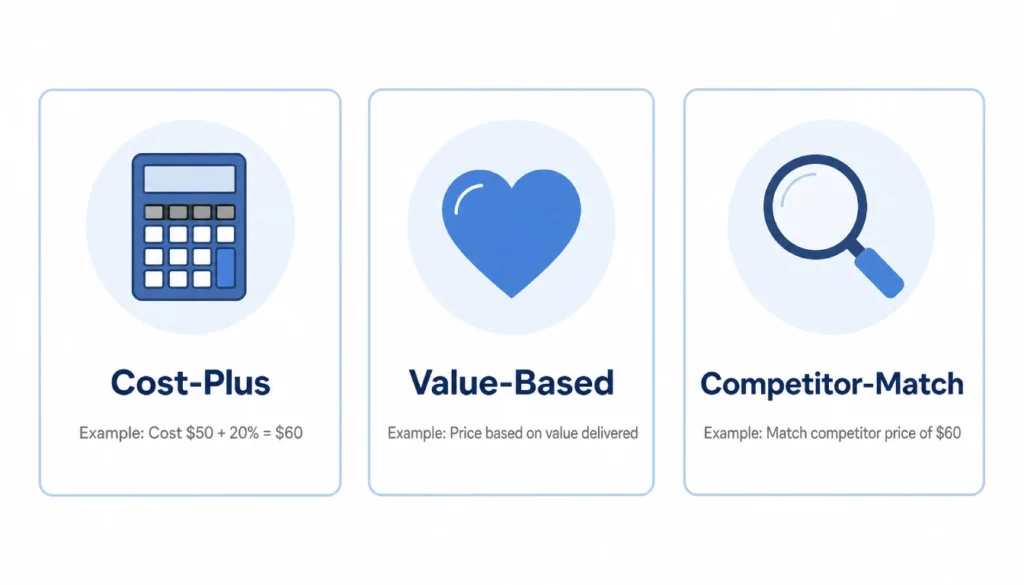
Cost-Plus Pricing: You add up the time you spent creating the product, assign a rough hourly value to your time, then add any hard costs like software or stock images. The total becomes your floor. You should never price below this number.
For example, if you spent 8 hours building a template pack and value your time at $15/hour, your cost is $120. That does not mean you charge $120, but it means you should never charge $3.
Value-Based Pricing: This model focuses on what your product is worth to the buyer, not what it costs you to make. A budgeting spreadsheet that helps someone save $500 a month is worth far more than the 4 hours it took you to build.
Ask yourself: what problem does my product solve, and what is that outcome worth to my ideal customer?
Competitor-Match Pricing: You look at what similar products sell for on platforms like Etsy, Gumroad, or Payhip, then position your price in the same range. This works best when you’re starting and have no sales history to lean on.
Most beginners combine all three. Start with your cost floor, check competitors for context, then price toward the value you deliver.
How to Research Competitor Prices in Under 30 Minutes
Researching competitor prices does not require a spreadsheet or a marketing background. Here is a simple process you can finish in one sitting.
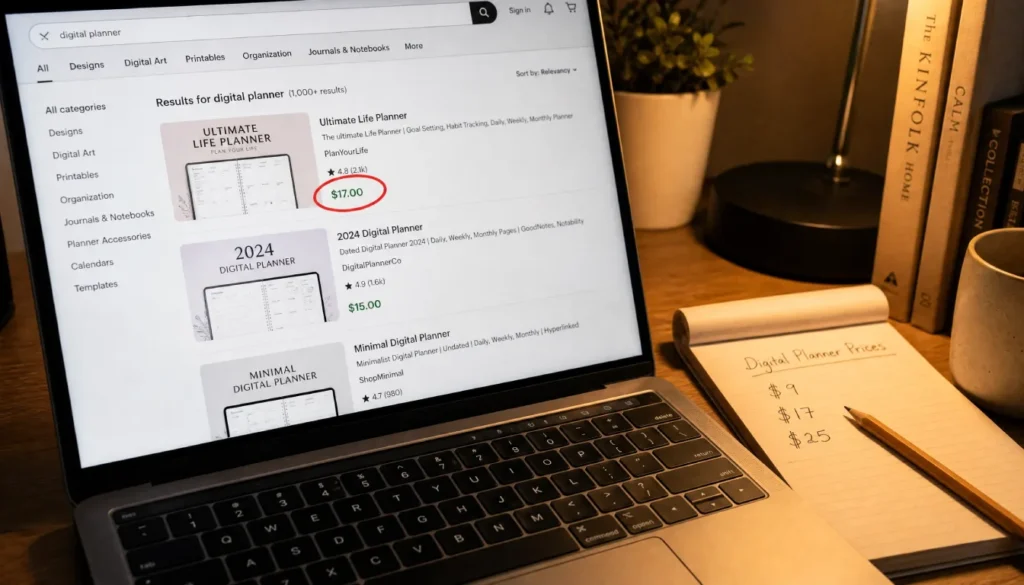
Step 1: Pick your platform. Go to wherever your target customer shops. Etsy works well for printables and templates. Gumroad or Payhip is better for guides, courses, and toolkits. Teachable or Podia if you’re selling a video course.
Step 2: Search for your product type. Type in what your product is, not what it does. Search “meal planner printable,” not “healthy eating tool.” Look at the first two pages of results, which are usually the best-selling products.
Step 3: Note the price range. Write down the lowest price, the highest price, and where most products cluster. You are looking for a realistic range, not a single number to copy.
Step 4: Check what the price includes. A $7 printable and a $29 printable might look the same on the surface. Look at what is inside each listing. Page count, bonuses, formats, and design quality all affect perceived value.
Doing this for how to research competitors’ prices for digital products takes about 20 to 30 minutes and gives you a reality check you cannot get from guessing.
A Foolproof Pricing Formula for First-Time Sellers
If you’re staring at a blank price field with zero idea what number to put in, use this three-step formula. It won’t give you a magic answer, but it will give you a confident, logical starting point.
Step 1: Find your price floor. Add your hard costs (software, stock images, fonts) plus the value of your time. This is the lowest you should ever charge. If it costs you $40 in time and tools to create a product, $5 is not a viable price.
Step 2: Check your 3 closest competitors. Go back to your platform and note the price range of the 3 products most similar to yours. If they’re clustered between $17 and $37, you have a realistic range to work within.
Step 3: Position your price based on the transformation you promise. If your product solves a clear, specific problem (saves time, makes money, fixes a real frustration), price it toward the higher end of your range. If it’s more of a general resource, stay in the middle.
Here is a quick example. A social media caption template pack on Etsy might range from $5 to $25. If you researched competitors and your product costs $18 in time to create, you would not go below $18. If your pack includes 100 captions across 10 niches, you might price it at $19 to $22 and be competitive without underselling.
This digital product pricing formula for beginners is not scientific, but it is far better than picking a number because it feels comfortable.
5 Common Beginner Pricing Mistakes (And How to Fix Them Fast)
Here are the mistakes most first-time sellers make. I made most of them myself, so you do not have to.
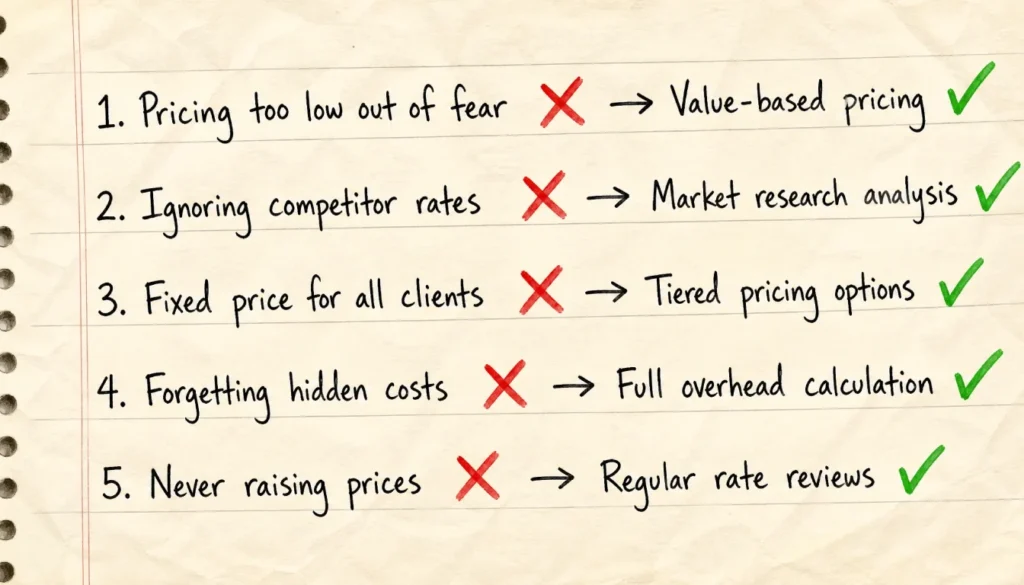
Mistake 1: Pricing too low out of fear. Charging $3 for a product you spent 20 hours creating signals low quality to buyers. Low prices do not always attract more customers. Sometimes they attract skepticism instead.
Fix: Use your price floor from Step 1 above. Never let fear push you below that number.
Mistake 2: Ignoring the value you deliver. Your product might take a buyer hours of frustration to figure out on their own. If you solved that problem for them in a clean, ready-to-use format, that time saving is part of your product’s value. Price accordingly.
Fix: Write down three specific outcomes your buyer gets. If those outcomes have clear dollar or time value, factor that in.
Mistake 3: Copying competitors blindly without context. Seeing a bestseller priced at $7 and matching it without knowing why they charge $7 is a mistake. That seller might have 800 five-star reviews and be using the low price to drive volume. You do not have that context yet.
Fix: Note competitor prices, but also note their review count, product depth, and what extras they include. Then position based on your actual offer.
Mistake 4: Leaving the price the same forever. Your first price is a test. Many beginners treat it like a permanent decision. It is not.
Fix: Set a 30-day review date when you launch. Check your conversion rate and adjust if needed.
Mistake 5: Using round numbers because they feel safe. Prices like $10.00 and $20.00 feel random to buyers when $9 and $19 signal a deliberate pricing decision. Odd-number pricing is one of the most studied effects in consumer behavior, and it works even with tiny differences.
Fix: Price at $X7, $X9, or $X5 instead of round tens.
How to Test Your Price Without Annoying Your First Customers
Testing does not mean flipping your price every three days. It means making one deliberate change, waiting long enough to see results, and then deciding.
Here is a simple approach:
Launch at your calculated price and let it run for 30 days or 50 visits, whichever comes first. Track how many people view your product page and how many actually buy. Most platforms give you this data for free.
If your conversion rate is above 3%, your price is probably working. Below 1% could mean your price is too high, or it could mean your product page needs work. Test one thing at a time.
When I launched my first digital product, I priced a simple meal planner printable at $4 because I was terrified no one would pay more. It sat there for three weeks with almost no sales. A friend who sold digital products suggested I try a value-based approach instead. I raised the price to $17, rewrote two lines of the product description, and made more sales that month than I had in the previous three weeks combined.
The price was not the only change, but it was the biggest one. Higher prices can signal more value. Sometimes the problem is not that your price is too high, it is that your price is too low to be taken seriously.
From Panic to Profit: Your Launch Day Pricing Checklist
Use this before you hit publish on your first product.
Before you set your price:
- Calculate your price floor (time + hard costs)
- Research 3 to 5 competing products on your platform
- Write down the transformation or outcome your product provides
- Set your price using the 3-step formula above
When you publish:
- Use an odd-number price ($17, $27, $37 rather than $20 or $30)
- Make sure your product page clearly describes the value, not just the format
- Set a calendar reminder for 30 days from now to review your conversion rate
After launch:
- Check views and sales in your platform analytics weekly
- If conversion is low, test one change at a time (price, title, or description)
- Raise your price as you collect reviews and social proof
Pricing digital products does not require a business background. It requires a clear process, a little research, and the confidence to launch and adjust.
Ready to Price Your First Digital Product?
Knowing how to price your first digital product as a beginner comes down to three things: knowing your floor, understanding your competition, and pricing toward the value you deliver.
You now have the formula. You have the checklist. And you know the five mistakes most beginners make before they ever make a sale.
Pick your number. Write it in. Publish. Then adjust based on real data, not fear.
If this guide helped you, leave a comment below with your product type and the price you landed on. Seeing what others charge is one of the best ways to calibrate your own thinking, and I read every reply.