You’re watching a big-budget movie, and something looks off. The actor doesn’t quite belong in the world behind them. You can’t name the problem, but your eye catches it anyway.
Most of the time, the answer comes down to a small set of repeating mistakes. These are the classic signs of bad green screen in movies, and once you learn them, you’ll spot them in seconds. Even your friends will wonder how you saw it first.
Grab a movie tonight and test yourself. Here are the seven tells.
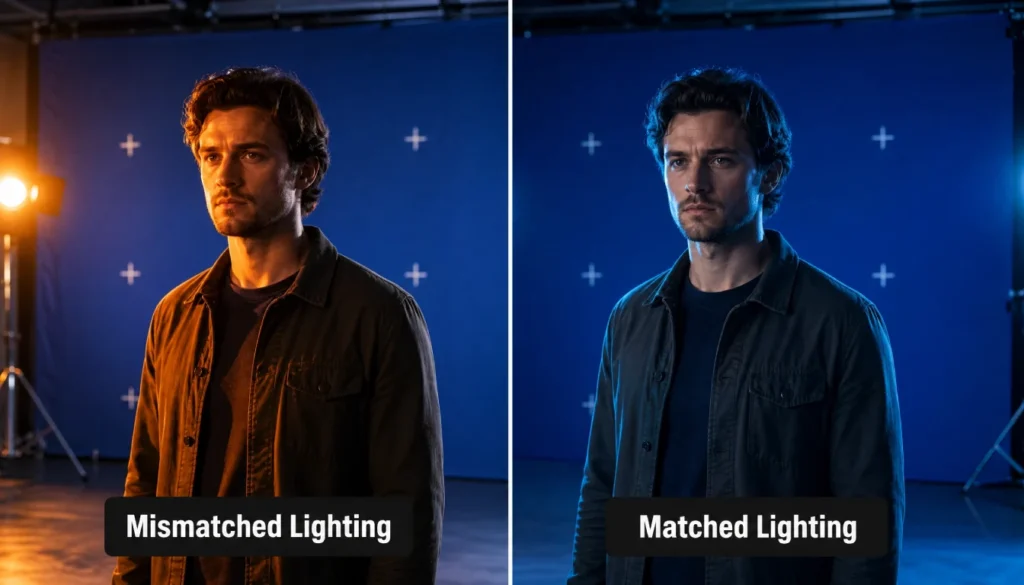
1. Unnatural Lighting on the Subject
This is the number one giveaway. The actor is lit one way. The background is lit another way. Your brain notices the mismatch before your conscious mind can explain why.
Watch the direction of the light on someone’s face. Now check the background. If the light source doesn’t match, in both angle and color, something was shot separately and stitched together later.
I once paused a fantasy movie because the hero looked lit by a soft studio lamp while the forest behind him glowed like late afternoon sun. Two different worlds, two different light sources. That’s the tell.
2. The Dreaded Green Spill Around Hair
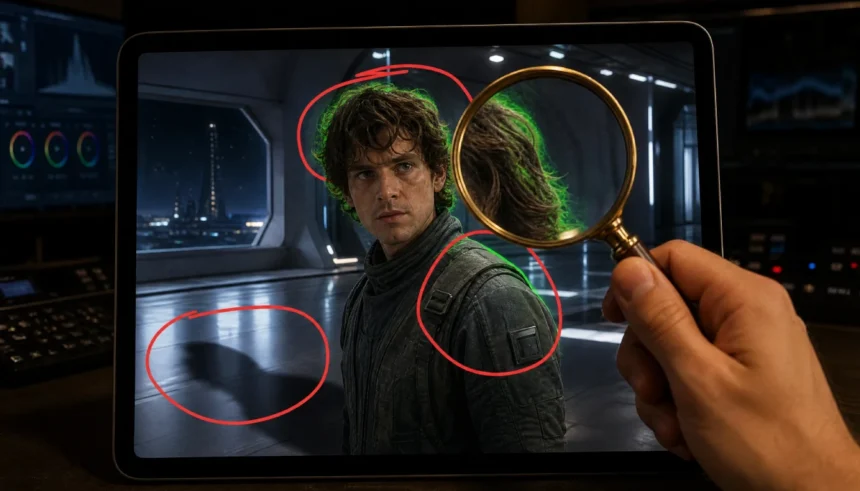
Here’s a dead giveaway you’ve probably seen and just didn’t have a name for. When a green screen isn’t lit or keyed correctly, a faint green glow leaks onto the edges of the subject. Hair shows it the worst, since fine strands are the hardest thing to key cleanly.
Once you know how to spot green screen spill, this flaw becomes impossible to miss. Look closely at the hairline, especially on backlit shots. If you see a thin green fringe hugging the edges, that’s spill.
I remember rewinding a superhero scene three times because the hero’s hair looked like it was glowing green at the edges. I showed a friend, and within a week she couldn’t stop seeing it either. This stuff hides in plain sight until someone points it out.
3. Mismatched Grain and Sharpness
Every camera and lens combination produces a specific texture. Film grain, digital noise, and sharpness all vary by equipment and lighting setup.
When a background plate was shot on different gear, or rendered separately in a computer, the texture won’t match the actor’s footage. The background might look too smooth, too sharp, or too clean compared to the grain on the actor.
Pause the frame and compare the noise level in the foreground against the background. A clear mismatch is a strong sign of a composited shot.
4. Hard, Digital-Looking Edges (Edge Artifacts)
A clean key should look invisible. A bad one leaves a visible outline around the subject, almost like a sticker pasted onto the frame.
These green screen edge artifacts show up most on curved or complex shapes, like shoulders, elbows, and flyaway hair. Watch for a hard, slightly darkened or aliased line where the actor meets the background.
Action scenes are the easiest place to catch this. Fast movement makes a shaky key line flicker, and that flicker is a dead giveaway.
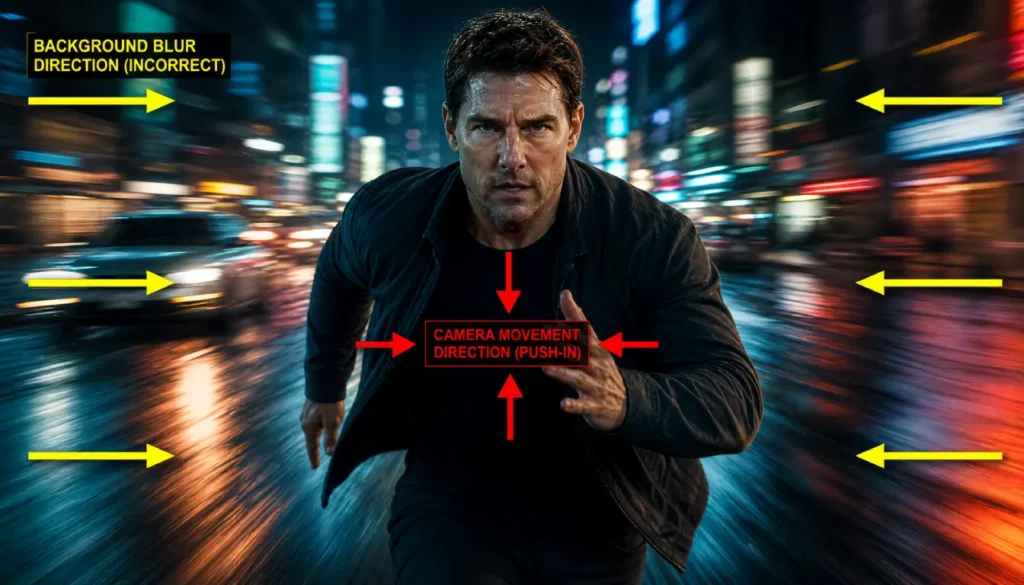
5. Motion Blur That Doesn’t Match the Scene
Cameras and moving subjects both produce motion blur, but the amount and direction should always agree. When they don’t, your brain flags it as fake before you consciously register why.
A motion blur mismatch green screen error happens when the background blur doesn’t match the subject’s movement. The character might be sprinting with a crisp, sharp look while the background behind them streaks in a completely different direction.
Watch a chase scene closely. If the actor’s motion feels disconnected from the background’s motion, you’re looking at a poor composite.
6. Shadows Pointing in the Wrong Direction
Shadows tell your brain exactly where the light is coming from. If an actor casts a shadow to the left but the light source in the background sits on the left side too, something is wrong.
This mistake is common in poor-lighting green screen scenes, where the crew lit the actor on set without matching the digital background added later. Check where the shadow falls under the actor’s feet, then check where the background’s shadows fall. They should line up.
When they don’t, you’re looking at two shots that were never designed to sit together.
7. Perspective That Feels Flat or Off
The last sign is subtler. It’s a feeling more than a specific detail. The actor might sit at the wrong scale for the background, or the camera angle on the background plate doesn’t match the angle the actor was filmed at.
This often happens in wide shots where a character stands in front of a huge digital environment. If the actor looks pasted on rather than standing inside the space, perspective is the culprit.
Trust that gut feeling. If a shot feels flat, pause it and check the horizon line and vanishing points. A mismatch there confirms what your eye already caught.
Why Even $200 Million Movies Get This Wrong
Big budgets don’t guarantee a clean key. Tight shooting schedules, actors filming against a screen instead of a real set, and rushed post-production all lead to shortcuts.
Studios often shoot a scene fast on set, then hand the compositing work to a visual effects team working under deadline pressure. Lighting reference photos get skipped. Motion data gets estimated instead of measured. Small errors slip through when hundreds of shots need finishing in a short window.
The budget pays for the shot count, not always the polish on every single shot. That’s why even blockbuster films have scenes that don’t hold up under a close look.
Your 30-Second Green Screen Spotting Checklist
Use this three-step routine any time you want to check a scene fast.
Step 1: Check the light. Look at the direction and color of light on the actor. Compare it to the background. Do they match?
Step 2: Zoom into the edges. Look at the hair and body outline. Watch for green tint, hard lines, or unnatural softness.
Step 3: Watch the motion. If the character moves, check whether the background blur matches their speed and direction.
Run through these three steps on any movie tonight. Once you catch one bad shot, you’ll start noticing them everywhere.
Final Takeaway
Spotting the signs of bad green screen in movies comes down to training your eye on a handful of repeating clues: lighting, spill, grain, edges, motion blur, shadows, and perspective. None of these require special software or a film degree. You just need to know what to look for.
Start with lighting and edges first. Those two catch the most mistakes with the least effort. Then work your way through the rest of the checklist as it becomes second nature.
Try this checklist on your next movie night. Pause a few big effects shots and see how many flaws you can spot. Drop a comment with the worst green screen mistake you’ve ever caught. I’d love to see what you find.